Showing posts with label Internet Gratis. Show all posts

Your Freedom with OpenVPN

OpenVPN is a full-featured open source SSL VPN solution that accommodates a wide range of configurations, including remote access, site-to-site VPNs, Wi-Fi security, and enterprise-scale remote access solutions with load balancing, failover, and fine-grained access-controls. Starting with the fundamental premise that complexity is the enemy of security, OpenVPN offers a cost-effective, lightweight alternative to other VPN technologies that is well-targeted for the SME and enterprise markets.

OpenVPN combines security with ease-of-use

OpenVPN’s lightweight design sheds many of the complexities that characterize other VPN implementations. The OpenVPN security model is based on SSL, the industry standard for secure communications via the internet. OpenVPN implements OSI layer 2 or 3 secure network extension using the SSL/TLS protocol, supports flexible client authentication methods based on certificates, smart cards, and/or 2-factor authentication, and allows user or group-specific access control policies using firewall rules applied to the VPN virtual interface. OpenVPN is not a web application proxy and does not operate through a web browser.

=======================================================

Mungkin kita sudah banyak membahas Your Freedom dan OpenVPN pada kesempatan sebelumnya dan mungkin sudah banyak yang mengerti cara penggabungan ini. Tetapi dikarenakan masih banyak yang menanyakan tentang OpenVPN, maka pada kesempatan ini akan ku posting secara lengkap….
Pertama kita anggap Your Freedom sudah tidak ada masalah, maka yang perlu dilakukan adalah :
Download OpenVPN di http://openvpn.net/download.html
Install OpenVPN
Aktifkan TAP-Win32 virtual ethernet adapter


Setelah TAP-Win32 virtual ethernet adapter terinstall, maka di network connection akan terpasang satu virtual ethernet lagi

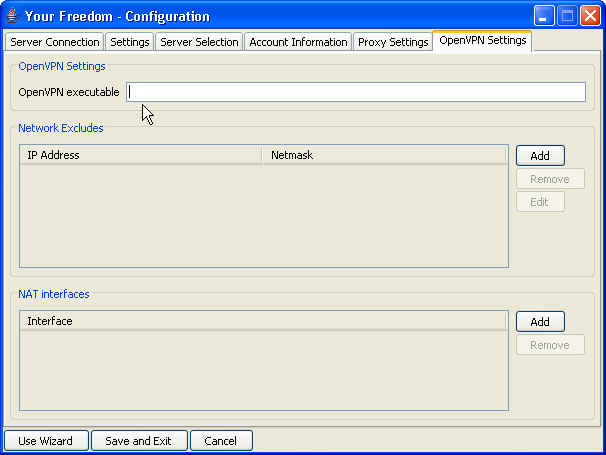
Di Your Freedom >> configuration >> openvpn setting masukkan alamat tempat OpenVPN terinstall.

Lakukan setting configuration >> server selection sesuai kebutuhan

Save and exit.
Aktifkan Ports >> OpenVPN Port.

Start Connection Your Freedom….
Jika berhasil, maka pintu Your Freedom akan terbuka

Dan di Message akan terdapat tulisan OpenVPN ready

Jika pintu Your Freedom tidak terbuka setengah (seperti tanpa menggunakan Your Freedom), atau di message, terdapat tulisan “could not executes……” (warna merah)

Coba masuk ke windows services dan lihat OpenVPN service apakah sudah start…

MASALAH YOUR FREEDOM SULIT KONEK XL

Di MASALAH PRO-XL KAWIN SAMA YOUR-FREEDOM telah dijelaskan bahwa untuk mengatasi sulitnya koneksi YF ke XL yaitu dengan :

Lakukan konfigurasi proxy xl [next]

Jika muncul tulisan hijau anda beruntung, jika muncul tulisan merah biarkan saja (lakukan berulang-ulang, untuk ping proxy xl). Cancel.

Lakukan konfigurasi manual di YF –> proxy XL, server YF, dan lainnya yang telah kubahas sebelumnya. Lakukan searching server YF secara berulang-ulang (untuk ping juga).

Jika tidak menemukan server YF, biarkan [save & exit], atau ulangi lagi searching lagi…

Lakukan koneksi ke server YF. Lakukan berulang-ulang sampai pintu YF terbuka.

Jika pintu YF sulit terbuka padahal cara-cara diatas sudah dilakukan, itu pertanda terjadi “kesalahan” dikoneksi HP (walaupun terlihat konek), maka lakukan salah satu cara dibawah ini :

  • Matikan hidupkan HP
  • Cabut tancapkan kabel data
  • Re-dialup berulang-ulang
  • Set jaringan HP secara manual, pilih jaringan selain XL, matikan hidupkan HP
  • Cari sinyal yang stabil (tidak perlu sinyal full)
  • Hapus cache & temperory browser

Internet Gratis via Toonel for PC

toonel.net is an experiment in a technique for conserving network bandwidth. If you are paying a fee based on the amount of data you transfer (e.g. 3G/GPRS/DSL/CDMA) and have monthly download limit, or if you have narrowband connection (e.g. dialup modem) then you are most likely to appreciate the service toonel.net offers. There are number of toonel.net client application packages. All solutions are 100% Java based and therefore this service can be used on any platform with an installed Java Runtime Environment, including mobile phones.

Toonel Generic Swing Package (Linux, Sun Solaris, Windows) – compiled against version 1.3 of the Java 2 Platform APIs, and targeted to run on version 1.3 or above of the Java 2 Runtime Environment, Standard Edition. This package comes with Swing UI.

Download versions:
0.0.50.50 (03-jan-2006) 120K.
0.0.50.45 (28-nov-2005) 110K.
version history

install dan setting :

Program toonel yg kita pakai ini, merupakan program under java (Java Runtime Environment/ JRE). Jadi untuk menjalankan toonel ini, Java Runtime Environment/ JRE harus sudah terinstall….

untukmenjalankan toonel, klik kanan ‘open with’ …..

Setelah terbuka, pilih Mapping dan klik 127.0.0.1……

Browser yg anda pakai, siap dipakai dengan mensetting proxy-nya dengan 127.0.0.1:8080 (seperti yg diset di proxy toonel di atas….


Internet Gratis Opera Mini Mod dan Three (3)

Three.co.id

3 berawal dari Hutchison Telecom International, salah satu perusahaan layanan telekomunikasi terbesar di dunia, yang memiliki visi untuk memberikan layanan komunikasi hari esok pada masyarakat ini. Dari visi inilah Hutchison CP Telecommunications Indonesia (HCPT) dibentuk dan untuk merealisasikan visi tersebut, HCPT mengoperasikan layanan 2G dan 3G di Indonesia di bawah bendera 3.

3 memang nama yang cukup unik untuk sebuah layanan telekomunikasi selular. Merek 3 sendiri diciptakan agar 3 dapat diaplikasikan ke berbagai negara dengan masyarakat yang berbeda. Merek ini harus dapat beradaptasi dengan budaya lokal namun tetap menjaga identitasnya. Karena itulah 3 disebut Three di Inggris, Australia dan Irlandia, Tre di Italia, Drei di Austria dan di Indonesia kami bangga disebut Tri.

Jadi apa yang akan membedakan kami dengan yang lain? Jawabannya adalah pengalaman ketika Anda menikmatinya. 3 bukan hanya sekedar nomor, lebih dari sekedar layanan 3G / 2G. 3 memberikan layanan-layanan yang menjawab semua yang Anda inginkan. 3 melintasi perbedaan bahasa, budaya dan teknologi, karena 3 membawa perubahan dalam hidup Anda.

Dengan karakternya yang unik, 3 membebaskan Anda dari semua limitasi dan mewujudkan keinginan yang mungkin tidak pernah terlintas di pikiran Anda. Jutaan orang di seluruh dunia sudah membuktikannya.


Internet Gratis via UCWEB

Browsing function

Are you boring with a dull WAP site? Are you upset with the blank display in a wap site? UCWEB will change all those problems on the mobile Internet! with UCWEB, you can not only visit WAP site quickly, but also the colorful WEB sites fluently, to enjoy the pleasantness of wireless thoroughly.

Navigation function

Wireless is more colorful! Information, entertainment, community, forum, blog, it’s all we have. Site navigation service recommends excellent internet sites and hot sites to you! Click! click! click! It’s so easily to access the site. Opening the site you want quickly, reading what you like, and listening what you love.

Search function

Don’t doubt the voluminous information can be searched on your mobile phone! With UCWEB, you can do it! UCWEB offers various search engines, such as Baidu, Google, Yicha, to satisfy your desire of searching the whole Internet. UCWEB supports to search by sort, such as web pages, MP3, pictures, maps,etc

E-mail service

By a mobile phone, you can enjoy a fresh experience of receiving & sending mails as quickly and conveniently as by PC anytime and anywhere! UCWEB builds-in mailing function, which supports the majority of mailboxes, such as 163, hotmail, Yahoo mail, and a lot of mail attachments formats (doc, xls, pdf, txt, jpg, bmp, htm, zip, e.g.), it encrypts account code and application program simultaneously, and protect your mail security at best, make you receive/send or write mails by mobile phone as smoothly as by PC.

Download function

Beautiful pictures!MP3!Characteristic phone ring tone! UCWEB lets you get all you want. The powerful download function makes your download easily, and which make you save time and cost.

UCWEB download function supports the big file download and the break points discontinuous transmission, which adopts the data compression technique to reduce the data traffic.

Personal data management

Do you regret that you can’t save the sites/pages you like? Is there no storage space for storing MP3, games? Is data lost when you change mobile phone? Don’t worry, UCWEB resolves these problems for you! It offers service such as bookmark, favorite, user can manage web sites which regularly browsed easily in mobile phone or in PC. The mobile phone hard disk is the bridge of PC and mobile phone, by which accessing the picture, MP3 and game is easy

RSS Subsciption Function

With a mobile phone, the latest hot Internet information can be subscribed! With RSS news subscription function you can subscribe RSS seeds, and manage the RSS resource, and then read the updated details in RSS freely. You can login directly in your mobile phone, or open http://my.ucweb.com/ to subscript the RSS seeds.

Shoutcut Key Aplication

With the shortcut key function, it makes the whole operation process of UCWEB simply, convenient. You can assemble shortcut keys with single key or double keys, and setup shortcut key by yourself. The customized service makes you enjoy the fully wireless happiness.

To Download http://www.ucweb.com/English/mobile_list.shtml

========================================================

Hasil Tes :

  • HP : Nokia 6210c, N70
  • Kartu : XL
  • Setting : tanpa setting, waktu jalankan pertama kali cari sinyal yang bagus (diutamakan 3G)
  • Installer : Pada pemilihan installer for symbian, inisialisasi error. Solusi, pakai file jar.
  • Pulsa : Pada pulsa Rp. 0 bisa jalan
  • Kekurangan : membuka web yg agak besar tdk bisa, walaupun setting awal bahasa Inggris, masih terdapat tulisan China
  • kelebihan : terdapat pilihan User Agent : Disable, UCWB, PHONE UA, OPENWAVE, OPERA

Internet Gratis Indosat dan IM3

Dari dulu, “kartu” yang satu ini sering terdapat bug……. mulai dari tetap gratis walaupun pulsa habis, pembelian voucer m2 gratis…… Memang dari dulu permasalahan di “kartu” ini ada di header value…..

===========================================================

Untuk yang pakai IM3, bagaimana kalau anda mendownload i-go….

gratis ya? disini ada celahnya ……

===========================================================

ISAT by 202.87.46.133

isat pake proxo + YF + openVPN

Sebelum dial-up pilih property >> Networking >> TCP / IP >> Properties >> Advanced >> Hilangin tanda centang yg ada di general

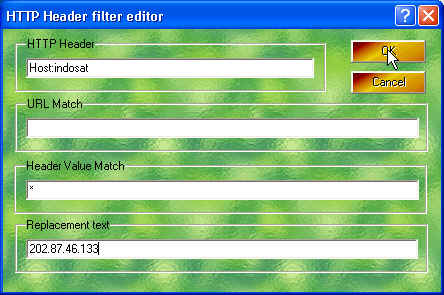
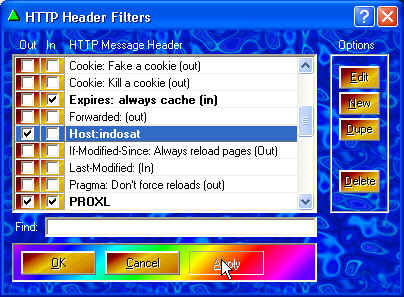
Sett Proxo >> Headers >> New >> HTTP Header diisi host:indosat >> URL Match kosongin >> Header Value Match * (bintang) >> Replacement text 202.87.46.133 >> Ok >> Apply >> centang out >> ok
Proxy 10.19.19.19:8080 (proxy isat)

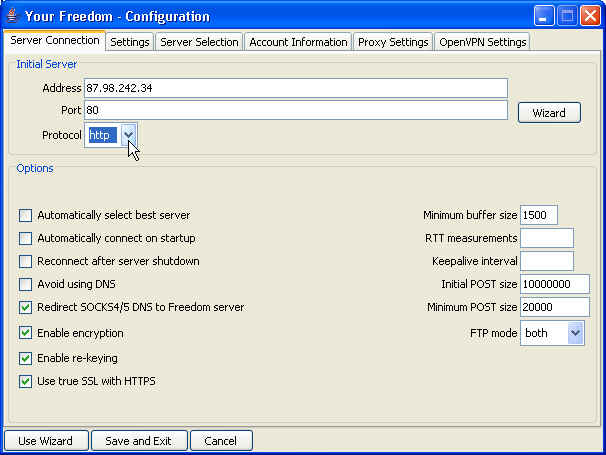
Sett YF >> configuration >> address terserah ems berapa, protocol https >> proxy setting 127.0.0.1:8080

>> OpenVPN setting diisi C:\Program Files\OpenVPN\bin\openvpn.exe (tergantung tempat instal, openVPN hrs diinstal) >> save&exit

>> buka port centang semua >> web proxy 4444 (terserah, yg penting sett proxy browser jg ngikut 4444) >> start connection

Sett proxy browser 127.0.0.1:4444 (ngikut port proxy web YF)

=============================================================

TRIK TANPA PROXO

Your Freedom Configure :

  • Server connection, address : wap3g.indosat.com@ems…… atau 202.87.46.133@ems…..
  • Port : 443, protocol : HTTPS
  • Proxy Settings, proxy:10.19.19.19:8080
  • Save & Exit
  • Start connection
  • Sett proxy browser 127.0.0.1:8080

Internet Gratis via Teashark

TeaShark gives you full web browsing on your mobile phone with superb usability and performance. It renders web pages the same way as desktop browsers. No more ‘mobile web’, your favourite sites are the same on your phone and the desktop.

TeaShark is absolutely free, feature :

Full Web for your mobile phone

TeaShark renders web pages the same way as desktop browsers. It’s no more mobile web with hardly any content. Your favorite sites are the same on your phone and the desktop.

Navigate intuitivelyThere’s an intelligent mouse for easy navigation. The cursor jumps to the next link to click, saving you the trouble. Navigate as fast or slow as you need with page up and down, left and right shortcuts. Jump to content: the display snaps to the text you’re reading.

2-level zoomTeaShark has unique 2-level zooming. The first level is for fine scrolling with reading capabilities, while the second is for quick jumping from section to section. You’ll never be lost on the page.

LandscapeGo sideways for a more natural feel. TeaShark can rotate the page 90 degrees to landscape mode.

Multiple tabs and historyTabs is a must for any browser. TeaShark has it. You can open a link in a tab and access it the same way as you would access your browsing history. You can easily slide back and forth, up and down. TeaShark also remembers your last session and when you start it up again, your browsing and tab history is there as you left it the last time.

Bookmark management with color taggingColor tagging helps you to keep your favorite pages organized. There are 8 pre-defined colors from which you can choose from.

Enhanced click and searchWith desktop-like text selection and phone number recognition.

And many more features

Including smart web address entry, find text, built-in web search, RSS reader, in-line editing, permanent history, you name it.

Go and download it Click Here

================================================================

Hasil Tes :

  • HP : Nokia 6210c, N70
  • Kartu : XL
  • Setting : tanpa setting, waktu jalankan pertama kali cari sinyal yang bagus (diutamakan 3G)
  • Lain : pulsa Rp. 0 bisa jalan


About Me

My photo
Presiden Director of : Monopoly Cell Groups, Monopoly Games and Internet Lounge, Monopoly Computer : Hardware, Maintenance and Supply Computer Product, Internet Networking Company, All in Depok City ,--------------------------, Send me Email : Radarmerauke@telkom.net

My Blog Stat :